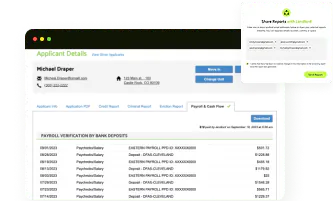
Reading a portable tenant screening report starts with four validity checks, then moves section by section through identity, rental summary, credit score, criminal background, eviction history, and income verification.
A Portable Tenant Screening Report (PTSR) packages a renter's financial and background history into one document that a landlord and an applicant can both reference, so knowing how each block fits together turns a page of numbers into a clear rental decision.
4 Validity Checks Before You Read Portable Tenant Screening Report
Landlords must verify the authenticity and freshness of a portable tenant screening report before reviewing any applicant background data. Document fraud detection ensures the applicant submitted an unaltered, legitimate screening file generated directly by an established Consumer Reporting Agency (CRA).
Portable vs. landlord-ordered screening
A portable tenant screening report (PTSR) is obtained and paid for by the prospective tenant, while a landlord-ordered screening report is requested by the landlord or property manager for the rental application. Whether a landlord must accept a portable report depends on state law.
In Colorado, HB23-1099, effective August 7, 2023, generally requires landlords to accept a qualifying PTSR and prohibits them from charging an application fee or a fee to access or use the report. However, there is an exception: a landlord does not have to accept a PTSR if the landlord accepts no more than one application fee at a time for a dwelling unit and refunds the full fee within 20 calendar days after written communication that either party is declining to enter into a lease.
Colorado also updated its PTSR rules through HB25-1236, effective January 1, 2026. If an applicant is seeking to rent with a housing subsidy, the PTSR does not have to include a credit history report, credit score, or adverse credit event. This means a landlord may receive a qualifying report with no Credit Score section, and that omission is not necessarily a reporting error.
In California, AB 2559 took effect January 1, 2023, but the system is voluntary: landlords may choose whether to accept reusable tenant screening reports. If a landlord accepts them, the landlord cannot charge the applicant a fee to access the report or an application screening fee. California is the only fully voluntary state among the seven states with PTSR-related laws.
For renters, the key difference is simple: Colorado generally requires acceptance of a qualifying PTSR, subject to its statutory exception, while California lets landlords opt in.
Issuing consumer reporting agency name & FCRA compliance footer
Every legitimate portable screening report should clearly identify the consumer reporting agency that issued the report.
The report should display information such as:
- Consumer Reporting Agency (CRA) name
- Contact information
- Report generation date
- Applicant authorization statement
- FCRA disclosure or compliance language
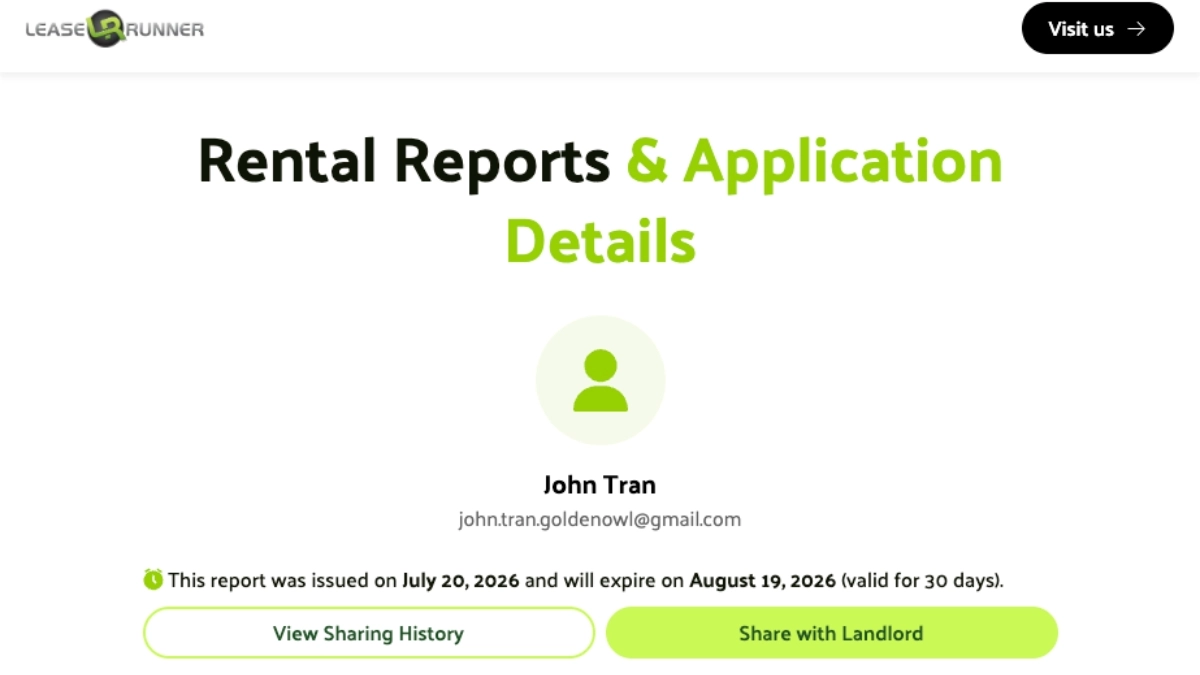
Look twice at a report with no agency name or no compliance notice. The Fair Credit Reporting Act governs who may obtain a consumer report and for what purpose, and a tenancy decision is one of the permissible purposes it recognizes.
Most real reports also spell out permitted use, dispute rights, and applicant consent, and those notices show that the file was built in accordance with FCRA rules. Missing disclosure language is your cue to verify the report with the issuer.
Applicant identity match
Match the report to the applicant before you read anything else. This step sounds obvious, yet small mismatches are still one of the top reasons an approval stalls.
Review information such as:
- Full legal name
- Date of birth (when available)
- Current address
- Previous addresses
- Social Security Number masking (if displayed)
- Driver's license or government-issued ID provided during application
Give the address list a close look, since past homes should line up with the rental application. Small gaps are normal, and a renter might drop an apartment number or shorten a street name, but bigger gaps need an answer before you go further.
For example:
- The application lists three previous residences, but the report shows only one.
- The applicant claims to have lived in Texas, while the report contains only California addresses.
- Employment history indicates relocation that doesn't match the address history.
None of these gaps prove fraud on their own, but each one earns a question before you sign a lease.
Tamper signals
Before checking fonts or PDF metadata, landlords should first verify where the PTSR came from and whether it was prepared by a legitimate consumer reporting agency. For example, Colorado's current law no longer allows landlords to require a tenant to provide the report directly from the CRA or through a third-party website.
For a LeaseRunner PTSR, landlords can verify the report through the shareable link provided by the platform rather than relying only on a downloaded PDF.
After confirming the source, check for simple tamper signals:
- Different fonts or misaligned tables
- Altered dates or numbers
- Missing sections
- Information that differs between the shared report and downloaded copy
If something looks wrong, verify the report through the original CRA or sharing platform instead of assuming that the PDF has been altered.
For income documents submitted with the application, landlords can also use LeaseRunner's guide on how to spot a fake pay stub to check for common signs of document manipulation, such as inconsistent formatting, unusual calculations, or mismatched employer and payroll details.
How to Read a Portable Tenant Screening Report (Section by Section)
Once authenticity has been confirmed, the next step is understanding what each section actually tells you. Reading a portable screening report in order allows landlords to build a complete picture instead of making decisions based on a single score.
Each section answers a different question:
- Is the applicant who they claim to be?
- Has the applicant paid housing obligations responsibly?
- Does the credit profile support financial stability?
- Are there criminal records relevant to tenant screening?
- Has the applicant been involved in prior eviction proceedings?
- Can current income reasonably support the proposed rent?
Looking at those sections together produces a much more accurate assessment than relying on any one metric alone.
Section 1: Rental Application
The Rental Application section verifies identity, pets, vehicles, emergency contacts, employer, move-in date, smoking, occupant count, and e-signature. Landlords should cross-check all applicant-provided figures against supporting documents (such as pay stubs, ID cards, and prior lease agreements) to ensure total consistency.
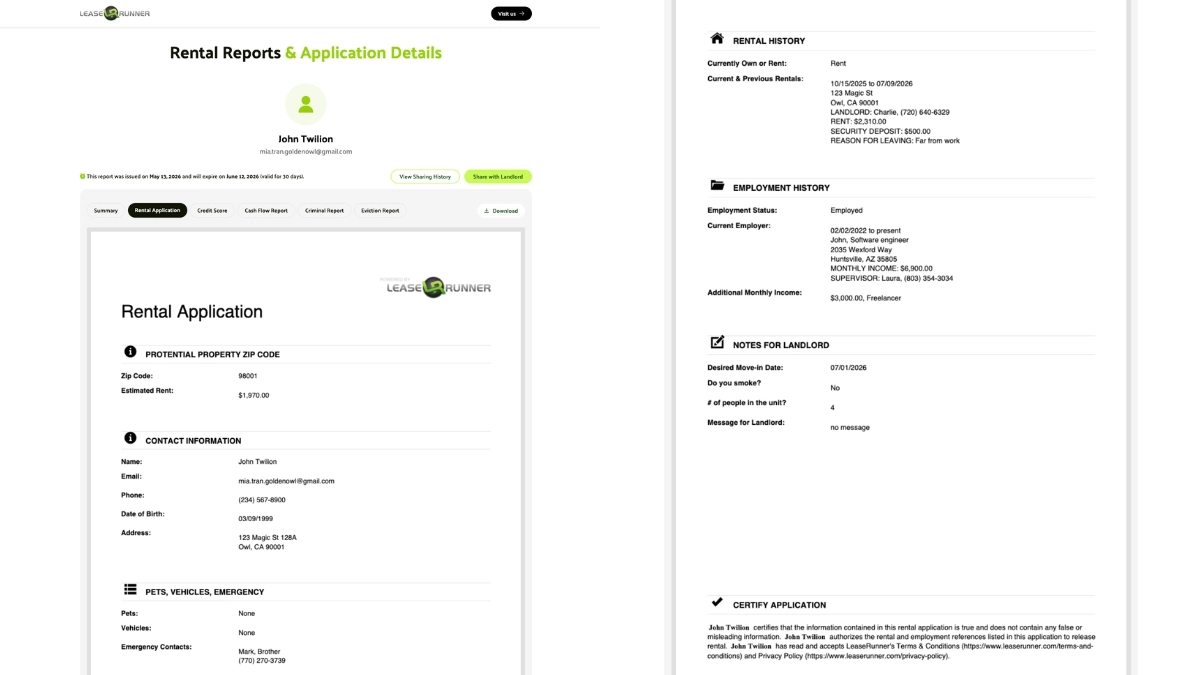
Key details displayed in this block include:
- Potential Property Zip Code & Rent: Confirms target lease parameters (e.g., Zip Code 03031, Estimated Rent $1,800.00).
- Contact Information: Full legal name (John Twilion), email address, phone number, date of birth (03/09/1999), and current physical address (123 Stage Dr, Ojai, CA 93023).
- Pets, Vehicles & Emergency Contacts: Documents pet allowances (None), vehicle registrations (None), and emergency contacts (Mark Doe, 213-123-4321).
- Rental History: Detailed record of current and previous rentals, including move-in dates, landlord contact numbers, current rent ($2,310.00), security deposit ($500.00), and reason for leaving ("Far from work").
- Employment & Income Verification: Current employer (Software Engineer at 2323 Market Way, Huntsville, Alabama), monthly income ($9,900.00), and additional monthly income sources ($1,000.00, Freelance).
- Notes for Landlord & Application Certification: Desired move-in date, smoking status (No), occupant count (4), and electronic signature certifying report authenticity under penalty of law.
Frequent relocation recorded across address histories does not automatically indicate lease instability. Traveling professionals, military personnel, and university students move regularly. Landlords should compare reported locations against the addresses listed on the rental application to confirm transparency.
Section 2: Rental Report Summary
The rental report summary consolidates housing history metrics, public records, and overall background checks into an executive snapshot. Landlords should treat this section as an analytical roadmap rather than a final leasing decision.
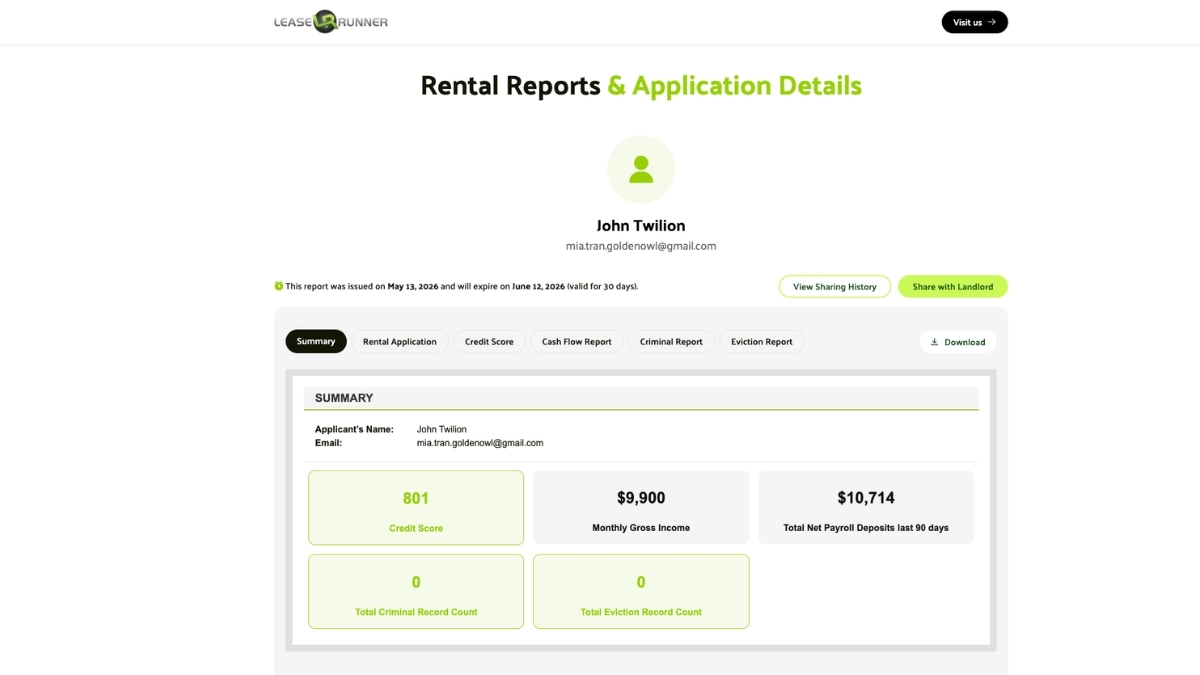
Common summary indicators include:
- Applicant Identifiers: Applicant Name (John Twilion) and registered contact email.
- Credit Score Metric (e.g., 801 Credit Score): Crucial Note: On a LeaseRunner PTSR, this number represents the RS³ (Rental Screening Science Score) calculated specifically against target rent, not a traditional credit bureau score (such as FICO or VantageScore). Applying standard bureau cutoffs to this metric is a common landlord mistake.
- Monthly Gross Income ($9,900/month) vs. Total Net Payroll Deposits Last 90 Days ($10,714): Comparing Stated Income ($9,900/mo) against Verified 90-Day Bank Deposits ($10,714) provides the single most valuable insight in the summary block. Here, verified direct deposits confirm the applicant’s actual net take-home cash flow aligns with or exceeds their self-reported gross income claim.
- Total Criminal Record Count (0) & Total Eviction Record Count (0): A display of "0" does not mean absolute zero history across a lifetime. It indicates that zero reportable convictions or court filings were located within the legally permissible lookback window defined by federal and state laws (e.g., FCRA rules or state-specific limits).
Negative summary flags should prompt a detailed inspection of the underlying credit, eviction, and criminal background sections. For a deeper dive into evaluating past landlord records, consult LeaseRunner's complete breakdown on what is on a rental history report.
Section 3: Credit Score
Reading the Credit Score tab means checking three things: the score, the predicted default rate that gives the score its meaning, and the rent amount the score was calculated against. This is because a portable report ties the evaluation to one specific monthly rent rather than reporting a single generic number
One point to settle before the numbers. The tab is labelled Credit Score, but the figure inside it is not a bureau score. It is RS³ (Rental Screening Science Score), LeaseRunner's proprietary model designed for rental decisions, not a traditional credit score. RS³ runs on the same 300–850 scale that a bureau score uses, which is exactly why it gets misread. A landlord who applies a familiar 620 or 650 cutoff to an RS³ number is answering a different question than the score asks. RS³ is calculated from verified bank activity ( payroll deposits, balances, cash trends, overdrafts and returned items...) This report is read alongside the applicant's rental application details and weighed against the exact rent under review, rather than from the tradelines, credit utilisation and loan history a bureau score is built on.
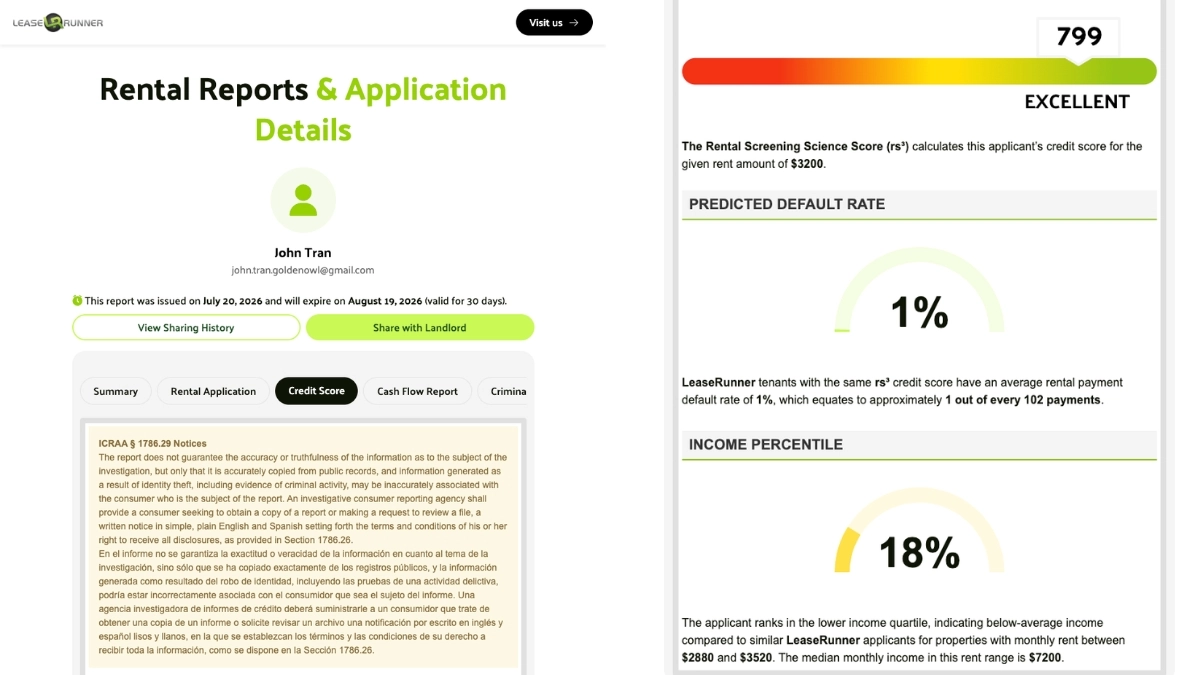
The tab displays its elements in the following top-to-bottom order:
- ICRAA § 1786.29 Notices (Legal Disclaimer): Appearing at the very top of the tab, this California-specific notice explains that the report does not guarantee the accuracy or truthfulness of information about the subject of the investigation. It states that information is accurately copied from public records, while information resulting from identity theft, including evidence of criminal activity, may be incorrectly associated with the consumer. The notice is displayed in both English and Spanish in the sample report.
- RS³ Score & Rating: The RS³ result and its rating — 799, EXCELLENT in the sample — are marked on a colour bar running red through amber to green. Directly underneath, the report names the rent the score was calculated for: $3,200 a month.
- Predicted Default Rate: The share of rent payments the model expects to go unpaid at this score. The sample shows 1%, which the report describes as roughly 1 out of every 102 payments, benchmarked against LeaseRunner's own tenant base rather than the wider rental market.
- Income Percentile Ranking: Places the applicant against other LeaseRunner applicants going for properties within 10% of the same rent — for a $3,200 unit, that means everyone who applied in the $2,880 to $3,520 range, where the median monthly income is $7,200. The LeaseRunner sample returns 18%, and the report states plainly what that means: the applicant sits in the lower income quartile, with below-average income for this rent band. The gauge turns amber rather than green to flag it. The comparison group is built from rent level alone, not from city, state or zip — so this is not a local income ranking..
Check the rent before you use the score. RS³ moves with the rent, and a portable report gets shared across listings at different prices. A score generated for an $1,800 unit tells you very little about a $3,200 one, even though the applicant, the bank data and the issue date are identical. If the rent printed under the score is not close to yours, the number on the page is not the number for your unit — ask the applicant to regenerate the report.
The rating label deserves a similar caution. RS³ ratings run along a continuous curve tied to predicted default, with no fixed cut-off separating Excellent from Good, Good from Fair, and so on. That makes the label shorthand and the default rate the precise reading: 799 and 1% belong together, and the percentage is what actually quantifies the risk.
Income percentile is a reference figure — it does not feed the RS³ score. The score says this applicant's banking behaviour supports the rent; the percentile says they earn less than most people applying at this price. One tells you how far the applicant is reaching, the other whether the reach holds up.
Note the median itself: $7,200 a month against $3,200 rent is 44% of gross income, so even the midpoint applicant in this band sits above the 30% mark HUD uses to define a cost-burdened household. Read a low percentile as a prompt to open the cash flow section, not as a reason to stop reading.
Taken together, the score, the default rate and the percentile give a rent-adjusted read on default risk that a bureau score cannot produce on its own. Landlords who also want to review tradelines, payment history, collections and bankruptcies can examine the bureau credit data drawn from Experian in the same screening file
Section 4: Criminal Background Results
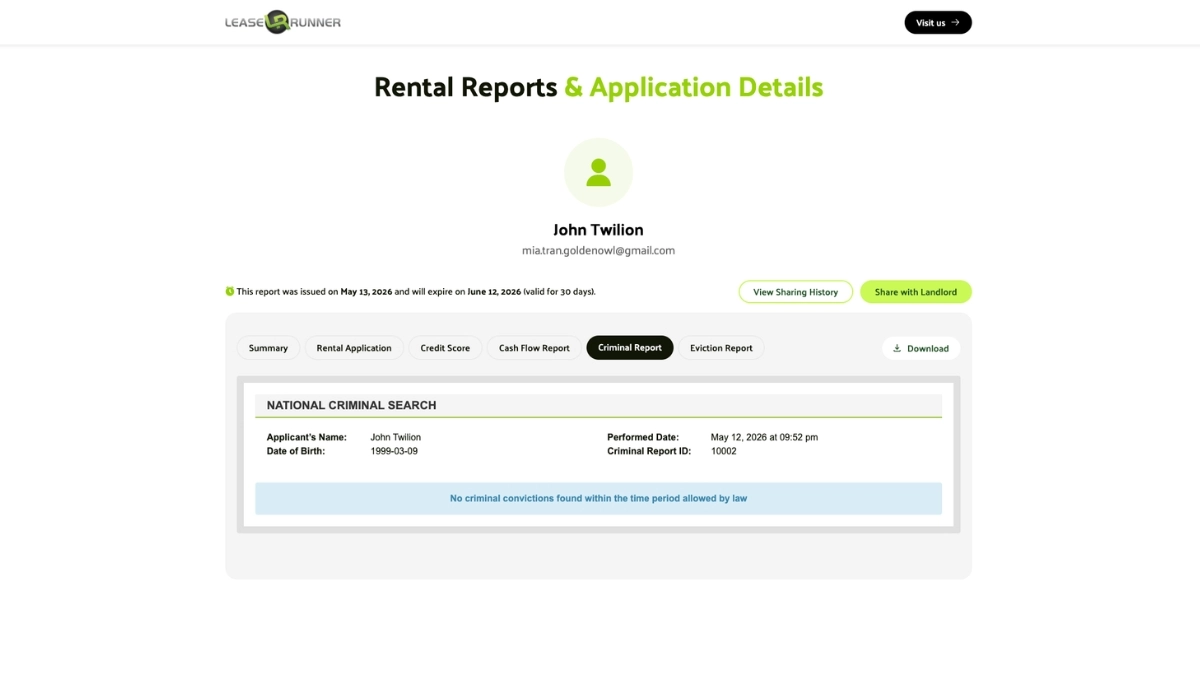
The criminal background section compiles federal, state, and county judicial records to screen for past criminal convictions relevant to tenant safety and property protection.
Standard criminal background checks include:
- Search Details: Applicant's full legal name (John Twilion), date of birth (1999-03-09), report performance date/time, and unique Criminal Report ID (10002).
- Search Results Summary: Displays explicit database status - such as "No criminal convictions found within the time period allowed by law", which confirms the applicant has no guilty convictions (not arrests) within the legally permissible lookback window (e.g., restricted to 5 years in states like Colorado under C.R.S. § 38-12-904, or standard FCRA limits)
- Database Coverage: Multi-state criminal database searches, National Sex Offender Registry checks, county court record searches, and OFAC terrorism watchlists.
While the Fair Housing Act (FHA) and legal theories of disparate impact remain in full effect, federal safe-harbor guidance from HUD has shifted. Following HUD’s September 2025 memorandum, the agency formally withdrew key FHEO guidance documents in Federal Register notices.
As a result, housing providers no longer rely on a federal safe-harbor framework. Instead, the legal obligation to perform individualized assessments (evaluating conviction severity, time elapsed, and direct relationship to safety) stems from state and local laws (e.g., state fair chance housing ordinances) along with ongoing litigation risks. Landlords must never use arrest records alone to deny housing.
When reviewing this section, landlords should ask several questions:
- Was the applicant arrested or convicted?
- How long ago did the offense occur?
- Does the offense relate to legitimate property or resident safety concerns?
- Does state or local law restrict consideration of certain records?
Looking beyond the headline often leads to a fairer and more informed decision.
Section 5: Eviction and Housing Court Records
The eviction history section works the same way as the criminal section — a national eviction search tied to name and date of birth, returning either matching case records or a statement that no eviction records were found within the legally allowed period.
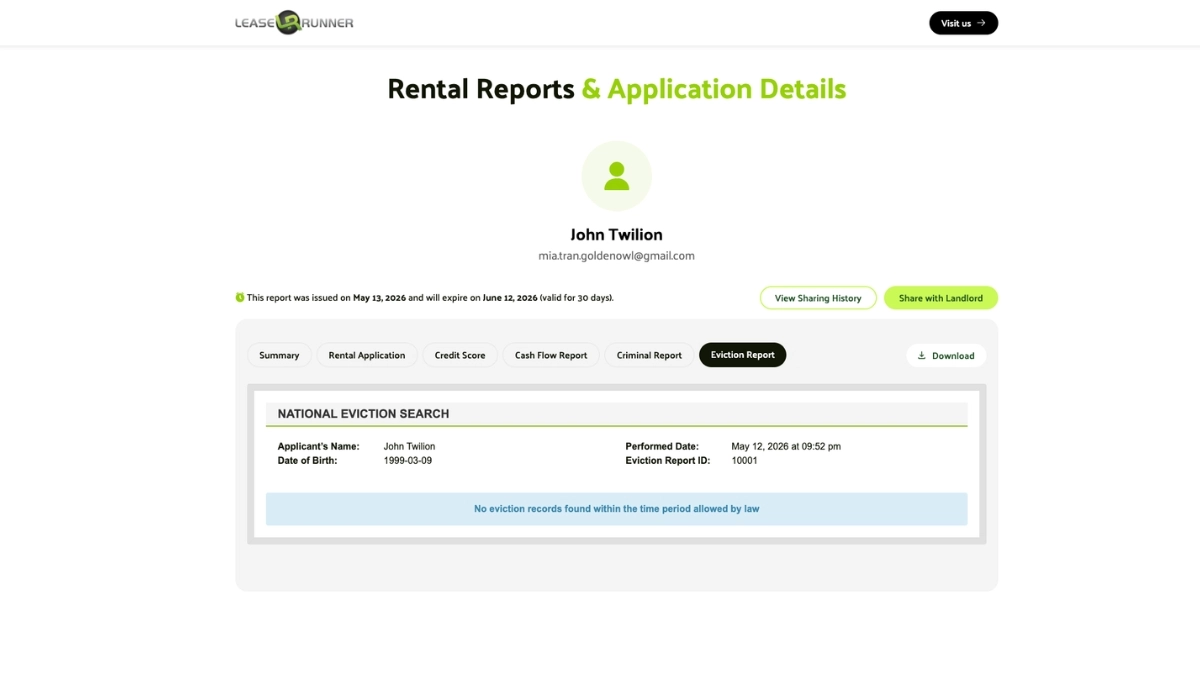
Information tracked in eviction reports includes:
- Search Parameters: Applicant legal name (John Twilion), date of birth (1999-03-09), report generation timestamp, and Eviction Report ID (10001).
- Search Findings: Direct indicator statement (e.g., "No eviction records found within the time period allowed by law"). This statutory lookback period typically spans 7 years under standard FCRA rules, though state laws may shorten the reporting window or restrict sealed/dismissed records.
- Judicial Scope: Tracks civil court filing dates, case numbers, landlord plaintiffs, case dispositions (Judgment, Dismissed, Settled), and monetary damage awards.
Interpreting eviction history requires examining case outcomes rather than raw filing counts. Filings that ended in dismissal or tenant settlement often indicate lease disputes or administrative errors rather than tenant default.
Section 6: Income and Cash Flow Verification
Employment/income verification inside a portable tenant screening report goes beyond a stated salary by pulling actual bank deposit data, labeling entries as payroll, military payroll, or other income, and excluding deposits made by check or transferred from a business account.
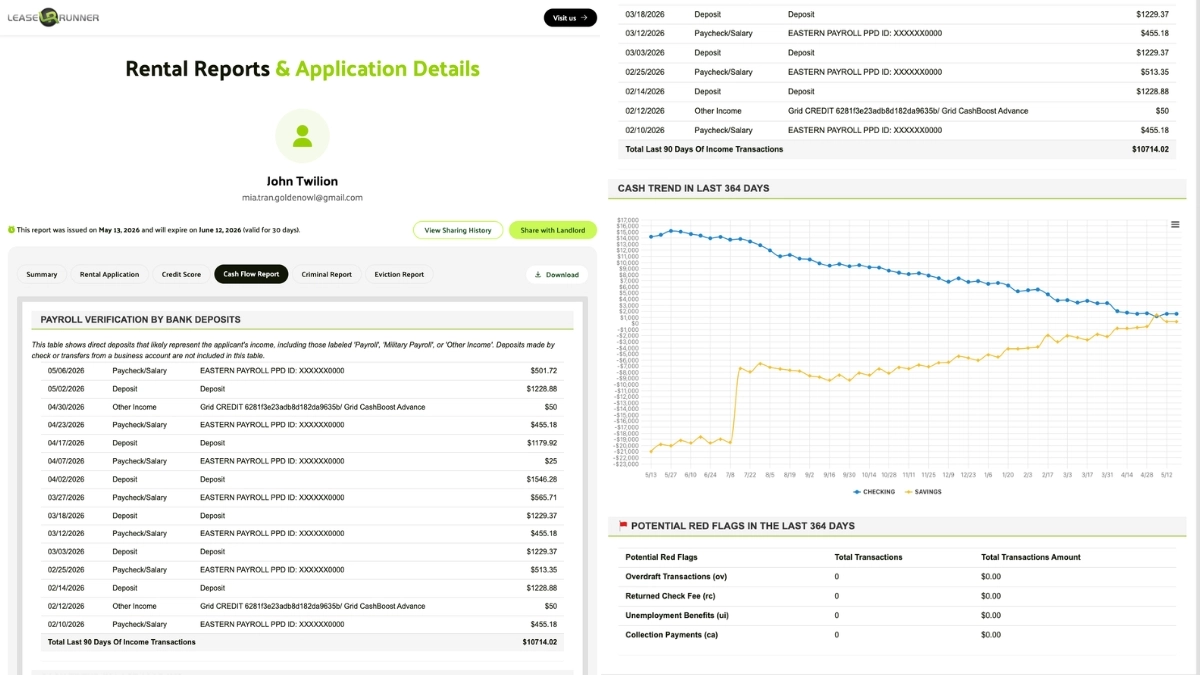
Key financial metrics reviewed include:
- Payroll Verification by Bank Deposits: Itemized table detailing direct deposits over the last 90 days (e.g., Eastern Payroll PPD transactions ranging from $455.18 to $601.72, cash boost advances, and total 90-day verified payroll deposits of $10,714.02).
- Cash Trend (Last 364 Days) - How to Read the Line Chart:
- Line Direction: An upward trajectory indicates growing savings and financial buffer. A flat line shows balanced cash flow where income equals expenses. A downward trajectory alerts landlords that the applicant is consistently burning through reserves to cover daily living costs.
- Ending Balance vs. Upfront Move-in Costs: Check whether the ending balance on the chart covers at least one month’s rent plus the security deposit. Low ending balances signal potential difficulty securing move-in funds.
- Cyclical Dips: Expect sharp periodic dips corresponding to monthly rent payments or major bills, followed by immediate rebounds on paydays.
- Potential Red Flags (Last 364 Days): Audit table logging risk indicators over the preceding year, including Overdraft Transactions (0), Returned Check Fees / NSF (0), Unemployment Benefits (0), and Collection Payments (0).
Evaluating verified net cash flow alongside payroll records ensures the applicant maintains sufficient disposable income after existing debt obligations to satisfy monthly rental payments.
What Makes LeaseRunner's RS³ Score Different?
RS³ (Rental Screening Science Score) answers a question no credit score asks: can this person afford this rent, at this unit? The number moves with the rent, so the same applicant can score one way on a $1,600 unit and another way on a $3,200 unit.
That comes from how LeaseRunner built the score. RS³ draws on 15 years of online ACH rent collection, covering hundreds of thousands of payments across all 50 states and more than 2,000 zip codes, with default data pulled from over 1,000 U.S. banks. The score is tied to rent default and returns a default rate next to the number, and it is licensed to LeaseRunner alone for tenant screening.
A traditional Portable Tenant Screening Report (PTSR) can provide credit, criminal, eviction, rental, and income information in separate sections. RS³ adds a rental-specific interpretation of that information by evaluating both creditworthiness and affordability at the target rent, then presenting the result alongside a predicted default rate.
What Factors Go Into RS³?
RS³ looks beyond a single credit number. LeaseRunner's model groups its inputs into four broad areas:
- Rent & Income: The rent being evaluated and the applicant's verified income relative to that obligation.
- Banking Behavior: Patterns in verified bank activity, including payroll deposits, account balances, cash-flow trends, overdrafts, and returned items.
- Application & Household: Information from the rental application and household circumstances that help put the financial data into context.
- Location: Geographic information used to place the application within the model's rental context.
Together, these factors allow RS³ to assess both financial reliability and the applicant's ability to support the specific rent, rather than treating either creditworthiness or income as a standalone measure.
What does RS³ add beyond a traditional PTSR?
RS³ does not replace the information already contained in a portable tenant screening report. Credit, criminal, eviction, rental, and income records answer different questions. RS³ adds a rental-specific assessment of whether the applicant's financial profile supports the rent being considered.
Take two applicants, both carrying a 700 credit score, both applying for the same $2,400 unit.
- Applicant A receives regular payroll deposits, maintains a sufficient bank balance, and has no recent overdrafts or returned payments.
- Applicant B has the same credit score and stated income, but has a lower available balance and recent overdraft or returned-payment activity.
A traditional PTSR can show these details, but the landlord still has to weigh them. RS³ adds another layer by evaluating the applicant's creditworthiness and financial capacity in relation to the $2,400 rent.
Now change the rent to $3,200. The underlying applicant information has not changed, but the financial obligation has. Because RS³ is rent-specific, the model can produce a different assessment at the higher rent. A traditional bureau score, by contrast, does not become a different score simply because the applicant applies for a more expensive apartment.
Why does this matter for landlords?
A traditional PTSR tells you what an applicant has done. RS³ tells you what that record means at the price you are charging — and it flags two situations the other sections routinely hide:
- Thin credit, stable financial behavior. An applicant with limited borrowing history may have less traditional credit information available, while verified income and consistent bank activity provide evidence of current financial stability.
- Strong credit, weaker cash flow. A high credit score reflects information in the credit file, but it does not by itself show how much money is currently available to meet a specific rent obligation. Bank activity can provide additional context.
These patterns are difficult to capture through a traditional credit score alone. RS³ brings the creditworthiness and affordability questions together at the rent level being considered.
Most importantly, RS³ should supplement rather than replace the full PTSR. Landlords should still review the underlying credit, rental, eviction, criminal, and income information and apply the same screening standards consistently.
Using the RS³ (Rental Screening Science Score) alongside the full Portable Tenant Screening Report allows landlords to:
- Compare applicants more consistently instead of relying on credit scores alone.
- See whether the rent you are charging is realistically affordable for each applicant.
- Quickly identify rental-specific strengths and potential concerns.
- Support more confident leasing decisions while still reviewing the complete screening report.
Common Mistakes When Reading a PTSR
Knowing how to read a portable tenant screening report also means knowing what not to do. Many screening mistakes happen because landlords focus on one section while overlooking the broader context.

Misinterpreting a "Dismissed" Eviction Case
A dismissed eviction case does not mean the applicant was evicted, since court records include cases that were dismissed, withdrawn, or settled before a judge ruled. Turning someone down because a case appears at all leads to the wrong call.
Always read:
- Case disposition
- Judgment status
- Filing date
- Court outcome
Relying Solely on the Credit Score
A credit score alone skips the rental report summary, eviction history, and income verification sections entirely, each of which measures a different kind of risk. An applicant can carry a strong credit score while showing a recent eviction, or a modest score while showing years of on-time rent payment.
Confusing "Resident Scores" with Traditional FICO Scores
RS³ and a FICO or VantageScore share the 300-850 range, which is why people mix them up, though they answer different questions. A bureau score rates general credit risk from loans and cards and stays put no matter which unit someone applies for, while RS³ rates rent default risk from bank and application data and shifts with the rent. Reading a 742 RS³ as "742 credit" misses the point.
Ignoring the Report's Expiration Date
These reports go stale quickly, which is why most state laws allow a landlord to insist that the file be no more than 30 days old. Colorado spells out what you can require: a report completed in the previous 30 days, free for you to access, and backed by the applicant's statement that nothing material has changed. Note that since January 1, 2026, under HB25-1236, Colorado landlords can no longer dictate how the report is delivered — an applicant may share it directly, and the report still qualifies.
A file pulled 45 days ago can miss a fresh eviction suit, a maxed-out card, or a lost job, and LeaseRunner's score runs on the same clock, staying reusable, shareable, and portable for 30 days from the issue date.
Failing to Match Address History Against the Application
Address history mismatches between the report and the rental application sometimes reveal an unreported prior eviction or an incomplete tenancy record, and skipping the comparison step removes an easy fraud check from the review.
Rejecting Applicants Based on Arrests vs. Convictions
An arrest is not a conviction, and several states bar you from weighing arrest records at all. Colorado is the strictest example, since C.R.S. §38-12-904 blocks any arrest record and most convictions older than five years.
Federal footing shifted between late 2025 and mid-2026: HUD signaled the change in a September 2025 memorandum and formally withdrew the 2016 criminal records guidance in a July 17, 2026 Federal Register notice, so check your state and city rules rather than leaning on the old federal safe harbor. Stick to conviction records that meet FCRA rules, and judge each case on its own facts.
Adverse Action Notice
If a landlord takes adverse action based in whole or in part on information in a consumer report, the FCRA requires an adverse action notice. The notice must identify the consumer reporting agency that supplied the report and provide information about the applicant's right to obtain a free copy of the report and dispute inaccurate information.
Conclusion
The report rewards patience. Confirm the file is real, then read it block by block with the RS³ Score measured against your own rent, and a stack of records turns into a decision you can defend later.
Renters gain from the same clarity, since they get to see how their records look to a housing provider. A screening file built on bank data costs less than a traditional credit report and remains portable for 30 days, so a single pull can cover several applications, and LeaseRunner runs that workflow end-to-end.
FAQs
1. Do I have to accept a portable screening report?
It depends on your state. Colorado requires you to accept a qualifying Portable Tenant Screening Report (PTSR) in most cases, with narrow exceptions written into the statute. California takes the opposite approach and lets you decide, though once you opt in, you cannot charge a screening fee. Check your own state law before you turn one down.
2. How long is a portable tenant screening report valid?
A portable tenant screening report is generally treated as current for 30 days, and states like Colorado let a landlord require that it was completed within the previous 30 days. Check the completion date before you rely on anything inside. Pricing and validity details are covered in how much a portable tenant screening report costs.
3. Can a tenant fake a screening report?
A tenant can edit a PDF, but mixed fonts, missing CRA branding, and edited file data give it away, and you can always call the issuing agency to confirm the report.
4. Does a portable report include a credit score?
Yes. LeaseRunner's PTSR pulls credit data from Experian, so you still see credit history, public records, and any liens, bankruptcies, or judgments. What's different is the score itself: instead of a FICO or VantageScore, the report leads with RS³ (Rental Screening Science Score), which is calculated from bank and application data against the rent you're charging.
5. What's a good tenant screening score?
It depends on the scale you are reading. A FICO or VantageScore above about 670 points indicates lower credit risk, while RS³ uses the same 300-850 range but measures rent default risk from bank activity and income against your rent. Because the number varies with the rent, no single cutoff works everywhere; compare RS³ scores for the same unit at the same price.
Disclaimer: The information provided in this post is intended for general informational and educational purposes only. It should not be construed as legal, accounting, or tax advice. For guidance specific to your situation, we recommend consulting with a qualified professional in the relevant field before taking any action based on the content provided.